Yerevan, 10.February.2026,
00
:
00
ՄԵՆՅՈՒ
Futsal tournament Galaxy Champions League 2024 kicks off Unibank is now a regular partner of “Pan-Armenian intellectual movement” IDBank issued another tranche of dollar bonds Green Iphone on the best credit terms at green operator's stores UCOM Provided technical assistance to Shengavit administrative district AMD 9,808,684 to the "City of Smile" Charitable Foundation. The next beneficiary of "The Power of One Dram" is known Unibank offers a “Special” business loan with an interest rate of 8.5% per annum IDBank implements the next issue of nominal coupon bonds Flyone Armenia will start operating regular direct flights Yerevan-Moscow-Yerevan New movie channels in Ucom and good news for unity tariff subscribers


5 способов узнать пароль своей Wi-Fi-сети

Lifestyle

Не знаю, как вы, а я частенько забываю пароль от домашнего Wi-Fi, и, учитывая частые эксперименты с оборудованием и гаджетами, это доставляет определённые неудобства при повторном подключении. Для таких случаев есть целых пять способов найти пароли от беспроводных сетей, к которым вы однажды подключались.

Посмотрите стандартный пароль на роутере
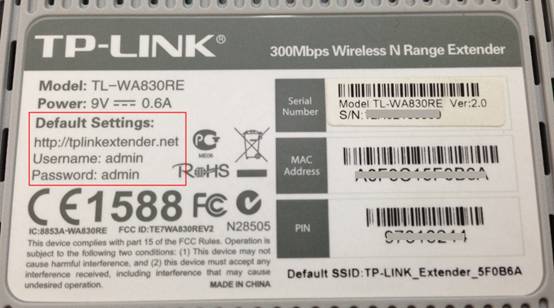
стандартный пароль wi-fi на роутере

Этот способ подойдёт для вашего личного роутера или любого другого, к которому у вас есть физический доступ. У большинства современных роутеров есть уникальное имя сети и пароль, присваиваемые по умолчанию. Обычно они печатаются на этикетке с серийным номером и прочей сервисной информацией или на специальной наклейке.

Вам остаётся только добраться до роутера и внимательно обследовать его тыльную сторону. Если там ничего нет, попробуйте заглянуть в инструкцию или погуглить модель роутера. Наверняка найдёте то, что ищете.

Узнайте пароль из настроек сети Windows

Если вы подключены (или когда-то подключались) к сети через Windows, то она любезно подскажет вам забытый пароль. В зависимости от версии Windows названия пунктов меню могут отличаться, но смысл примерно тот же.


пароль wi-fi в настройках сети Windows

Нужно перейти в «Центр управления сетями и общим доступом» и добраться до списка беспроводных сетей. Затем открыть свойства нужной сети и посмотреть пароль в поле «Ключ безопасности сети», не забыв поставить галочку на «Отображать вводимые знаки».

Посмотрите пароль в «Связке ключей» в OS X

С Mac всё точно так же. OS X хранит пароль от любой сети, к которой вы когда-нибудь подключались, и, разумеется, его можно увидеть.
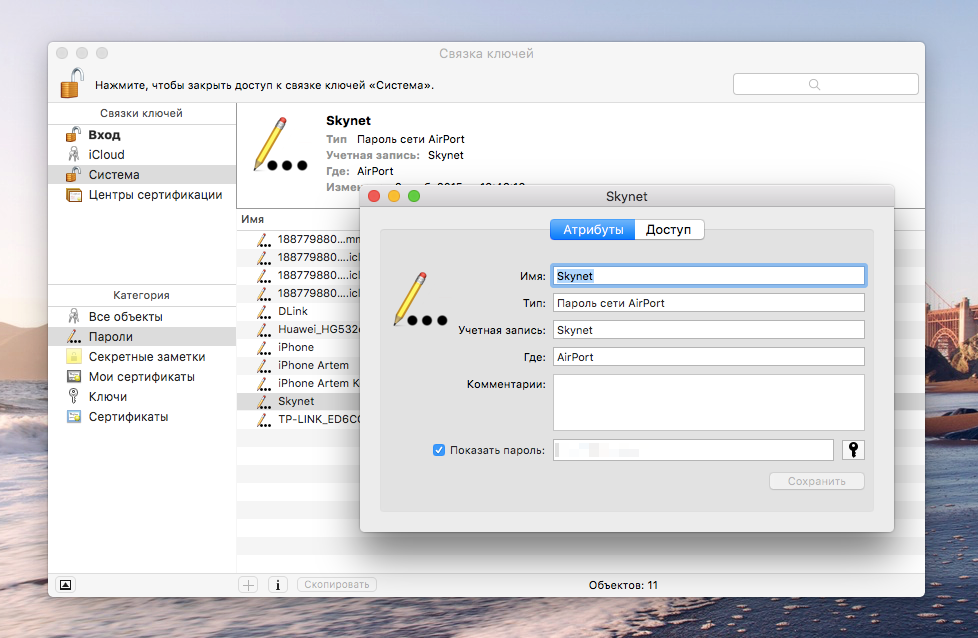
пароль wi-fi в Связке ключей на Mac

Делается это в «Связке ключей», где хранятся все ваши пароли. Запускаем её через Spotlight или из папки «Программы» и выбираем на боковой панели слева раздел «Система». Далее находим нужную сеть в списке и жмём на кнопочку «i» на панели ниже. Ставим галочку возле «Показать пароль» и после ввода пароля администратора видим наш пароль от Wi-Fi.

Найдите пароль в веб-интерфейсе роутера

Если у вас есть доступ к веб-интерфейсу, то пароль роутера можно посмотреть там. Для этого надо перейти в браузере по адресу 192.168.0.1 (или 192.168.1.1) и ввести логин и пароль. Структура меню у каждого производителя отличается, но суть в том, чтобы найти раздел Wireless Network, в котором есть пункт Security с опциями защиты. В нём и содержится наш ключ, то есть пароль беспроводной сети.
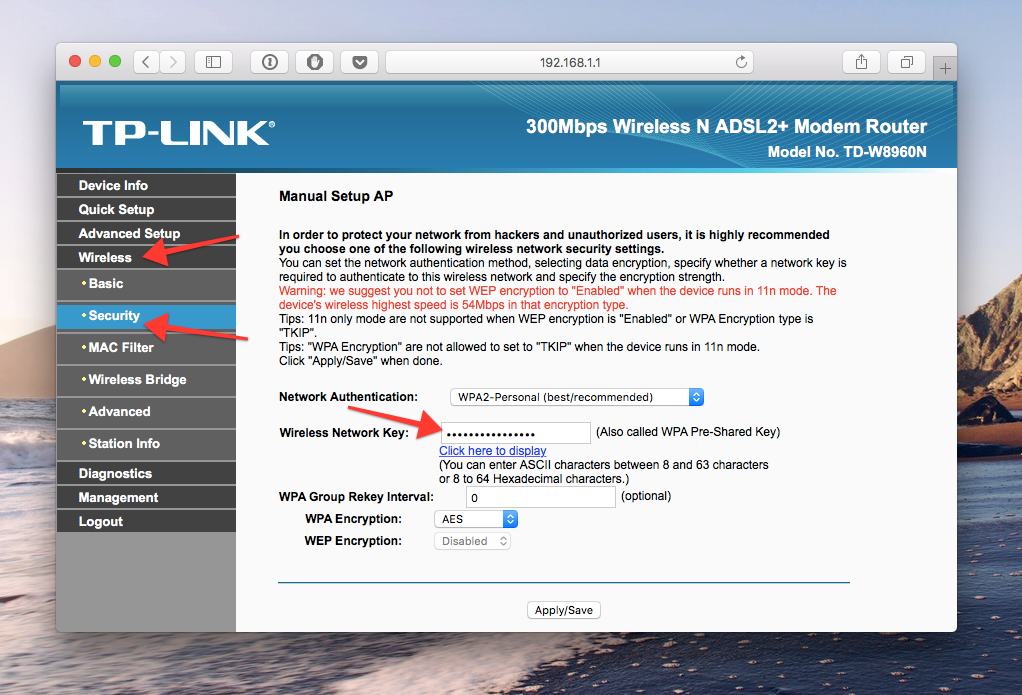
пароль wi-fi в веб-интерфейсе роутера

Выглядит необходимое нам меню примерно вот так. Пароль по умолчанию скрыт, и для его отображения нужно нажать на кнопку Display password или что-то в этом роде.

Сбросьте пароль и задайте новый

Ничто не устоит против грубой силы. Если пароль нельзя достать, значит, нужно его взломать, то есть сбросить. Этот способ годится только в случае, когда нужен пароль от вашего домашнего роутера, но сработает на абсолютно любом маршрутизаторе, поскольку у каждого из них есть физическая кнопка сброса. Единственный минус — если ваш провайдер использует специфические настройки подключения, его придётся настраивать заново.

пароль wi-fi можно сбросить

Итак, достаём роутер из шкафа, с антресолей — или где он там у вас спрятан — и внимательно смотрим на ту его часть, где расположены порты и кнопки управления. Ищите небольшое отверстие, рядом с которым написано Reset. Это и есть кнопка сброса. Её нужно нажать скрепкой или иголкой и подержать несколько секунд (если не поможет, то зажимаем reset и, не отпуская кнопки, выключаем роутер на 30 секунд, а затем, продолжая держать кнопку, включаем и отпускаем ее через 30 секунд). После этого настройки роутера сбросятся на стандартные и вы сможете узнать пароль одним из способов, описанных выше.

IDBank’s Nor Nork branch has reopenedOn the impossibility of making payments via Idram for telecommunication operators’ services and the current situationWhen CSR Becomes a Driving Force for Business Development: Lala Bakhshetsyan Five-Year Partnership Between AraratBank and 4090 Charity Foundation Comes to Successful Close Idram and Weixin Pay (WeChat Pay) Launch Strategic Partnership in ArmeniaThe Winners of the Third Round of the Junius Competition Have Been AnnouncedWhat to gift men on January 28: Idram&IDBankIdram Conducted a Financial Literacy Class for Roboton ParticipantsRegarding Payments for Viva Armenia Services via IdramVahe Hakobyan Is a Political Prisoner: Past.amUp to 2% Cashback with IDBank Mastercard and ARCA CardUp to 2% cashback, free Mastercard and free ArCa card when you join IDSalaryAraratBank Sums Up “You Choose the Destination” Campaign Implemented in Partnership with MastercardBook by March 31 and get 15% off your FINTECH360 ticket Ucom Launches Fixed Network Services in Zovuni The FINTECH360 conference will be held in Yerevan from April 27 to 29 AraratBank Partners as General Sponsor of 4090 Charity Foundation's Five-Year Milestone EventAraratBank Takes the Lead in Brand PR Performance Unforgettable Moments and a Profitable Offer at Myler. Idram&IDBank Idram Summarizes 2025The Power of One Dram Donates 5,788,105 AMD to the City of Smile Charity Foundation Converse Bank Successfully Completes Globbing Bond Placement Why the Pressure on Vahe Hakobyan Continues Ucom Introduces Hecttor AI to Improve Call Center Communications The Armenian Apostolic Church: Refutation of a False Premise Vahe Hakobyan Is Being Politically PersecutedIdram employees are the Secret Santa Claus for the students of the Orran Day Care CenterAraratBank Donates AMD 8 million to the Reconstruction of the Spandaryan CanalUnibank Launches Gift Cards New Education Platforms through Cooperation between AraratBank and Aren Mehrabyan FoundationTech Innovator and Winemaker Adam Kablanian Joins the Board of Trustees of the “Music for Future” FoundationUcom Reopens Sales and Service Center on Tigran Mets Avenue AraratBank Receives Visa Trusted Partnership Award 2025 Secret Santa at idplus: Anonymous Gift CardsWe condemn the unlawful actions by Armenia’s Gov. against the Armenian Apostolic Church. Jan Figel Free Style issues Armenia’s first corporate bonds in the fashion retail sector, placed by Cube InvestUnibank Completed the Placement of Its Third Issuance of Perpetual BondsScholarship for 100 Artsakh Students as Part of IDBank’s “Side by Side” Program The results of the second Junius financial literacy competition have been summarized From idea to implementation: Ameriabank Presents the Programs Implemented under My Ameria, My Armenia CSR Campaign Ucom and SunChild Launch the “Smart Birdwatching” Educational Program AraratBank Supports Digitization of "Karin" Scientific Center ArchiveWelcome to the ID booth: Big Christmas MarketWidest 5G Coverage, the Launch of the Uplay Platform, and the Integration of Cerillion: Ucom Summarizes 2025 Ucom and Armflix Present “13 Seconds” at KinoPark How to Choose a Career Path and What Skills are Considered Crucial: AraratBank on the GoTeach Platform Unibank Issues a New Tranche of Perpetual Bonds with 13.75% Coupon Unibank Became a Member of BAFTThe December beneficiary of “The Power of One Dram” initiative is the “City of Smile” Foundation EBRD lends US$ 40 million to Acba bank for youth-led firms in Armenia